

Why Replit + Sheet Ninja?
Replit is an amazing tool to spin up apps very quickly. A few prompts and you have something real running in a browser.
But when someone asks "can we update the underlying data ourselves?", things get awkward. Replit's built-in database is fiddly to configure, and handing a non-technical person access to a database is a non-starter.
Sheet Ninja gives you the power of Replit for the app itself, with Google Sheets as the interface. No logins to manage, no admin panel to build, no training required.
The use case
A restaurant wants a QR code menu (the kind customers scan at the table to see what's on offer). It needs to work on phones, load quickly, and be easy for staff to keep up to date without calling a developer every time the soup changes.
The restaurant manages everything directly in the Sheet. The owner logs into a spreadsheet they already know, updates a price or marks a dish as unavailable, and the menu reflects it instantly.
Here’s how:
1. Set up your Google Sheet
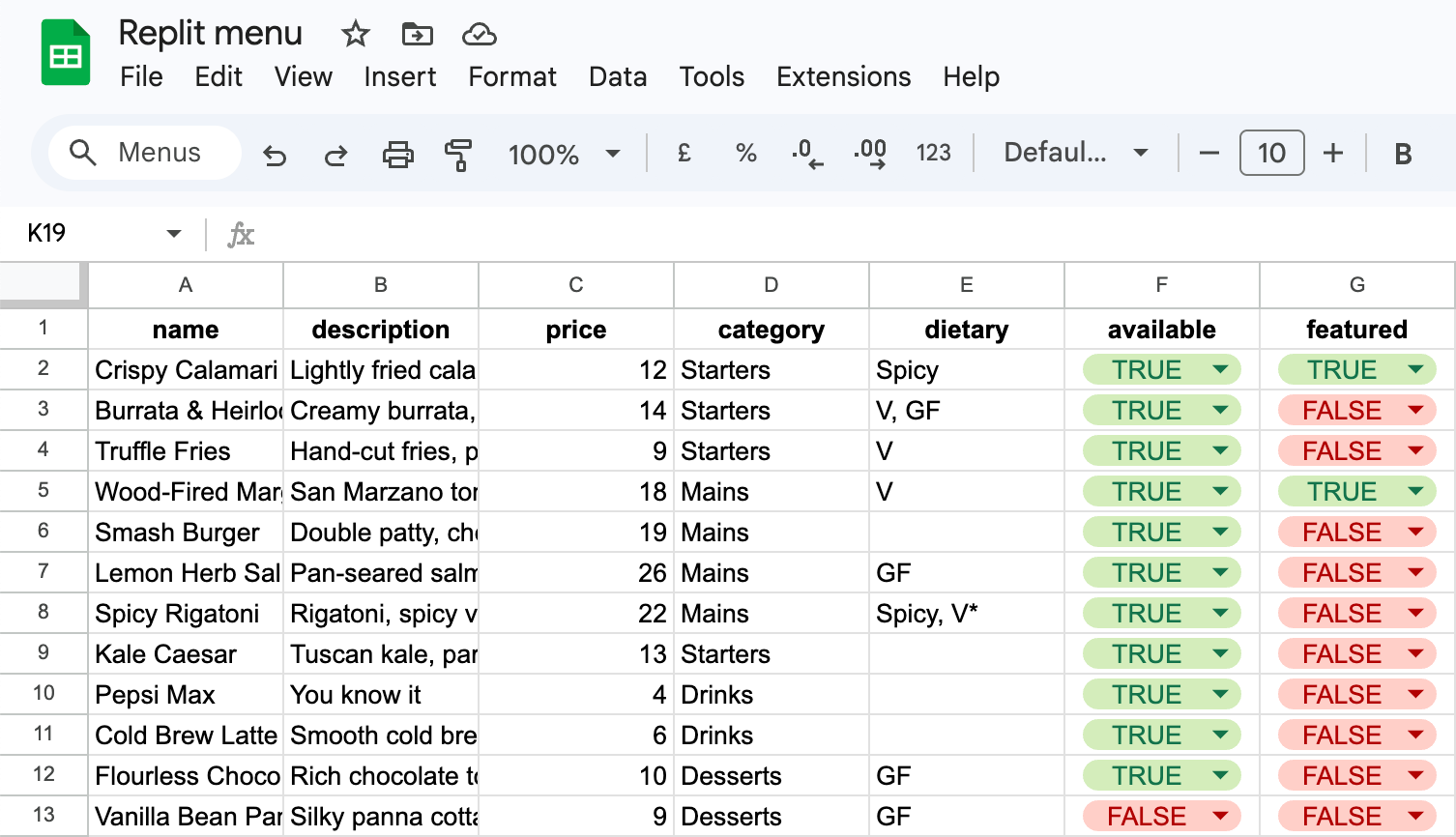
Create a new Google Sheet and add these column headers in Row 1 and some sample data:
| name | description | price | category | dietary | available | featured |
|---|---|---|---|---|---|---|
| Crispy Calamari | Lightly fried calamari with lemon aioli and chili flakes | 12 | Starters | Spicy | TRUE | TRUE |
A few notes on the columns:
available: set to true to show the item, false to hide it. Useful for seasonal dishes or anything that's sold out.
featured: set to true to pin the item to the top of its category and give it a visual highlight. Great for chef's specials or high-margin dishes.
dietary: free text for labels like V, VG, GF, or Spicy. Leave it blank if there's nothing to flag.
2. Create your Sheet Ninja API
Then go to sheetninja.io, connect your Sheet, and copy your API endpoint URL. That's it. Here’s the Quickstart guide if you need a reminder.
3. Build it in Replit
Open a new Replit project and paste this prompt into the editor:
1Build a QR code restaurant menu (Replit app).
2
3Here's everything you need:
4
5--- DOCS ---
6API reference: https://docs.sheetninja.io
7
8--- DATA ---
9- The data lives in a Google Sheet connected via Sheet Ninja. My Sheet Ninja base URL is <<YOUR ENDPOINT>>
10- The sheet has these columns: name, description, price, category, dietary, available, featured,
11
12--- HOW IT WORKS ---
13- This app is meant to be opened from a QR code (mobile-first)
14- Fetch menu items from Sheet Ninja and show only items where available is "true"
15- Group items by category (e.g., Starters, Mains, Drinks, Desserts)
16- Items where featured is "true" appear at the top of their category and are visually highlighted
17- Each item shows: name, description, price, optional dietary text (from dietary, e.g. “V”, “GF”, “Spicy”), Include a simple filter so visitors can filter by category (and an “All” option)
18- Sort items: featured items first, then sort the remaining items alphabetically by name
19
20
21--- KEEP IT SIMPLE ---
22
23- Build it as a small Replit project:
24- Clean, readable layout optimized for phones
25- Show a friendly error if something goes wrong
26- If there are no available items, show a friendly empty state (e.g., “Menu coming soon”)
Replace YOUR_ENDPOINT with your Sheet Ninja URL and let Replit build it.
What you get
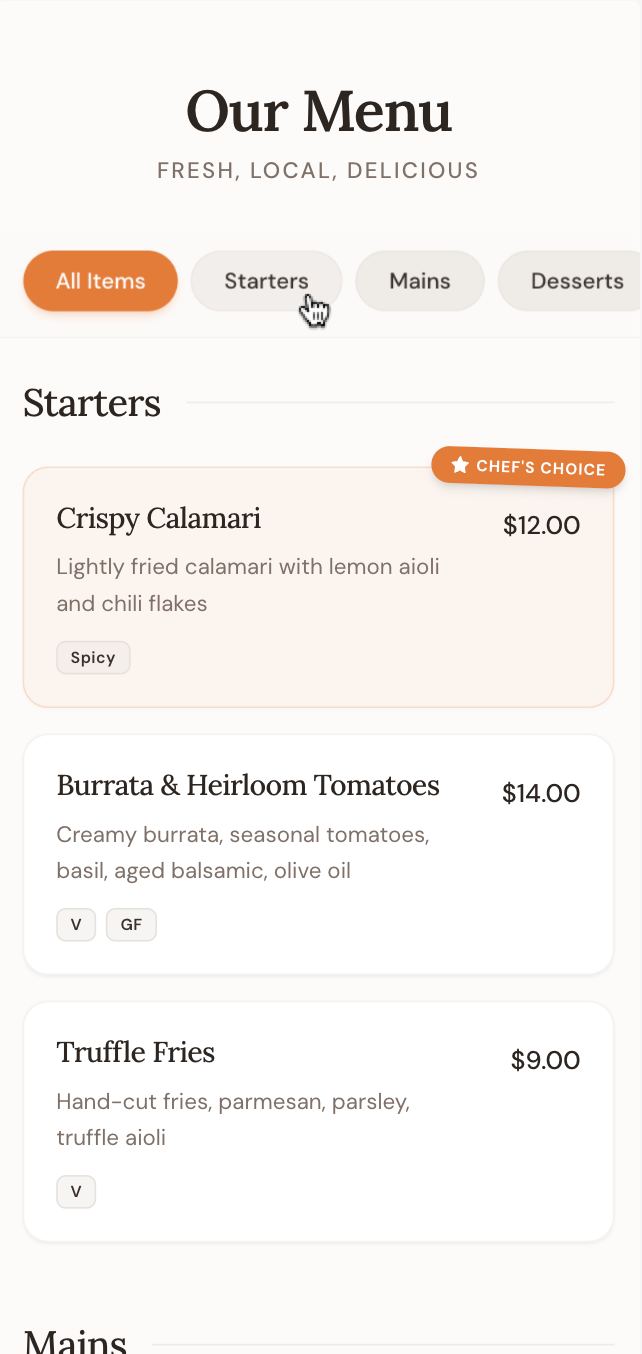
And if you ever need to edit the menu: Just do so directly in the Google Sheets:
Why Google Sheets?
The restaurant doesn't need to learn a new tool. They open the Sheet, find the row for the dish they want to change, and edit the cell. Price increase? Change the number. New special? Add a row. Dish sold out? Set available to false. The menu updates immediately.
It also means the menu is always accurate. There's no sync delay, no export/import step, no "ask the web person" bottleneck. The Sheet is the menu.
And when the restaurant wants to add a new category - Sunday roasts, seasonal salads, whatever - they just use the new category name in a row. The app picks it up automatically and creates the tab.